This post was published in 2015 and may contain information, techniques or code examples that are no longer current. Please double-check official documentation and modern best practices before using anything from this article.
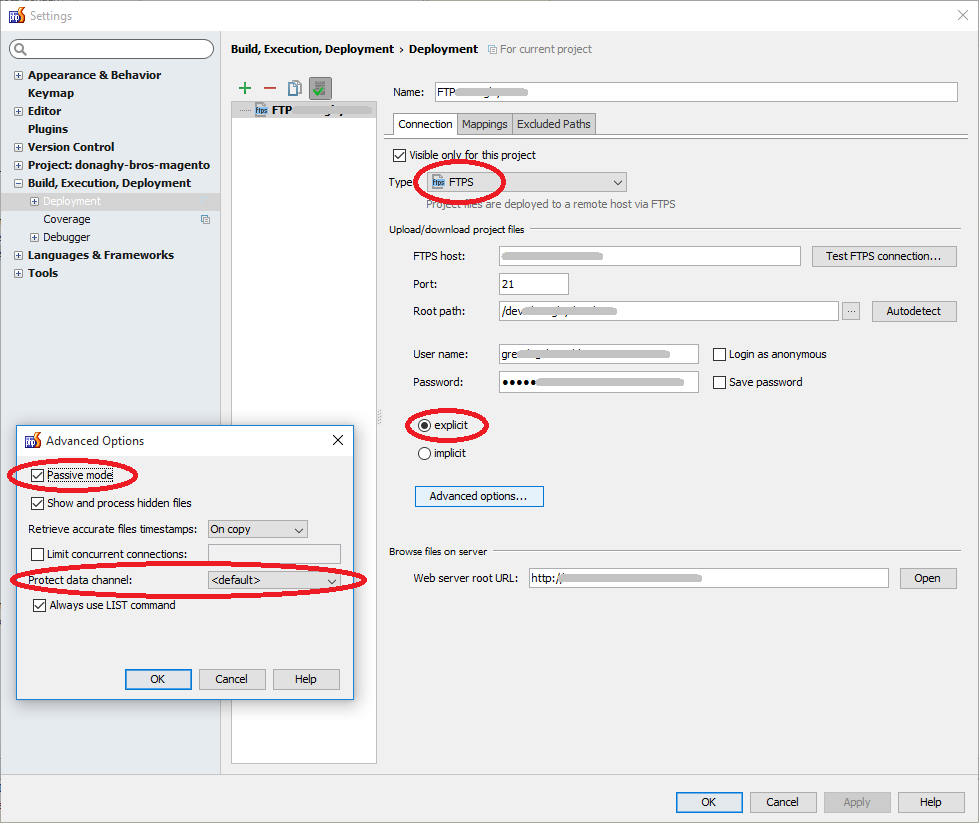
If you’re having issues connecting to a server via FTPS in phpStorm I found that the magic combination for PHP Storm and FTP-SSL connections is…
- Type: FTPS
- SSL: Explicit
- Passive Mode: On
- Protected data channel:
In particular the Protected data channel was set to “PRTO C” by default on my install and it was that causing the bother.
Error Message:
[23/11/2015 12:13] Failed to transfer file 'C:\web\htdocs\
•••••\••••••••••••\test.txt': cant open output connection for
file "ftps://•••.•••.•••.•••/test.txt". Reason: "500 I won't
open a connection to 192.•••.•••.••• (only to 81.•••.•••.•••)".
Solution
See also: JetBrains PHP Storm: Creating a remote server configuration
Latest posts
—
What is agentic browsing?
Agentic browsing transforms the web browser from a passive display window into an autonomous AI agent that can interpret natural language commands and execute complex tasks across websites on your…
—
Core Web Vitals: Optimisation techniques
Google's Core Web Vitals have become the de facto standard for measuring user experience on the web. For years, developers have focused on the foundational trio: Largest Contentful Paint (LCP),…
Continue reading "Core Web Vitals: Optimisation techniques "
—
Web Safe Fonts: A Quick Explainer for Developers
If you've ever built a website and wondered why your carefully chosen typography looks completely different on someone else's screen, you've encountered the world of web safe fonts. Let's break…
Continue reading "Web Safe Fonts: A Quick Explainer for Developers "
—
Choosing the right content management system
Choosing the right content management system (CMS) is one of the most consequential early decisions when building a website The content management system shapes everything from how editors publish to…
Continue reading "Choosing the right content management system"
